Add Cinematic Effect to Video
Understanding the Cinematic Effect
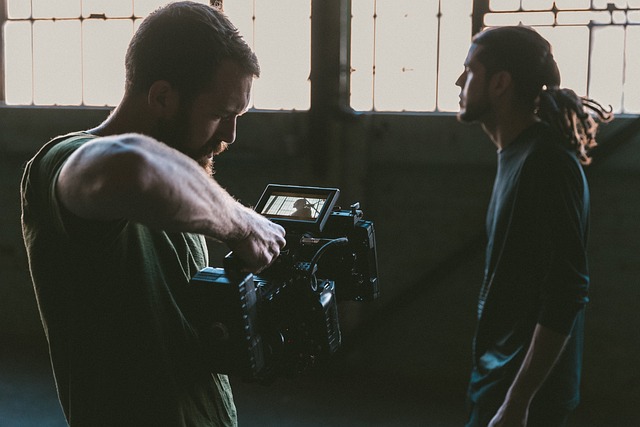
Creating a cinematic effect in video production is about more than just high-definition footage. It involves a blend of techniques that enhance the visual storytelling aspect of your work. Whether you are a beginner or have some experience, understanding these elements can elevate your videos from ordinary to extraordinary.
Key Techniques to Achieve a Cinematic Look
- Color Grading: One of the most significant aspects of achieving a cinematic effect is through color grading. This process involves adjusting the colors in your footage to create a specific mood or atmosphere. Tools like Adobe Premiere Pro or DaVinci Resolve offer extensive color grading options. Aim for a color palette that complements the narrative of your video.
- Aspect Ratio: The aspect ratio can dramatically influence how your video is perceived. Most cinematic films use a wider aspect ratio, such as 2.35:1. You can achieve this by cropping your footage or adjusting your project settings. This simple change can make your video feel more like a film.
- Depth of Field: Utilizing a shallow depth of field can help isolate your subject and create a more professional look. This technique blurs the background, drawing attention to the focal point. It can be achieved through camera settings or by using specific lenses.
- Lighting: Proper lighting is crucial in creating a cinematic atmosphere. Natural light can be beautiful, but using additional light sources can help you control the mood. Soft, diffused lighting often works well for a cinematic feel, while harsh lighting can create tension.
- Camera Movement: Smooth camera movements can enhance the storytelling aspect of your video. Techniques such as panning, tilting, or using a gimbal for stabilization can add a dynamic quality to your shots. Avoid shaky handheld footage unless it serves a specific purpose.
Editing for Impact
Editing plays a vital role in achieving a cinematic effect. The pacing of your cuts can influence the emotional response of your audience. Consider the following tips:
- Transitions: Use transitions sparingly. Simple cuts or fades often work best in maintaining the flow of your narrative.
- Sound Design: Sound is just as important as visuals. Incorporate ambient sounds, sound effects, and a well-chosen score to enhance the emotional depth of your video.
- Storytelling: Keep in mind that a cinematic effect is not just about visuals; it’s about telling a compelling story. Ensure that your editing choices support the narrative arc and engage your audience.
Final Touches
After applying these techniques, take a moment to review your work critically. Ask yourself if the visuals align with the story you want to tell. Sometimes, less is more. A few well-placed effects can have a more significant impact than overwhelming your audience with too many elements.
Conclusion
Adding a cinematic effect to your videos is an art that combines technical skills with creative vision. By focusing on color grading, aspect ratio, depth of field, lighting, and thoughtful editing, you can transform your videos into captivating visual stories. Remember, practice makes perfect, so keep experimenting and refining your craft.
 vikki99






















 Syd Barrett Pink Floyd
 Health
  Fitness
  Lifestyle
  Tech
Tech  Travel
  Food
Food  Education
  Parenting
  Career & Work
  Hobbies
  Wellness
  Beauty
  Cars
Cars  Art
Art  Science
  Culture
  Books
Books  Music
Music  Movies
  Gaming
  Sports
  Nature
  Home & Garden
  Business & Finance
  Relationships
  Pets
Pets  Shopping
  Mindset & Inspiration
  Environment
  Gadgets
  Politics